

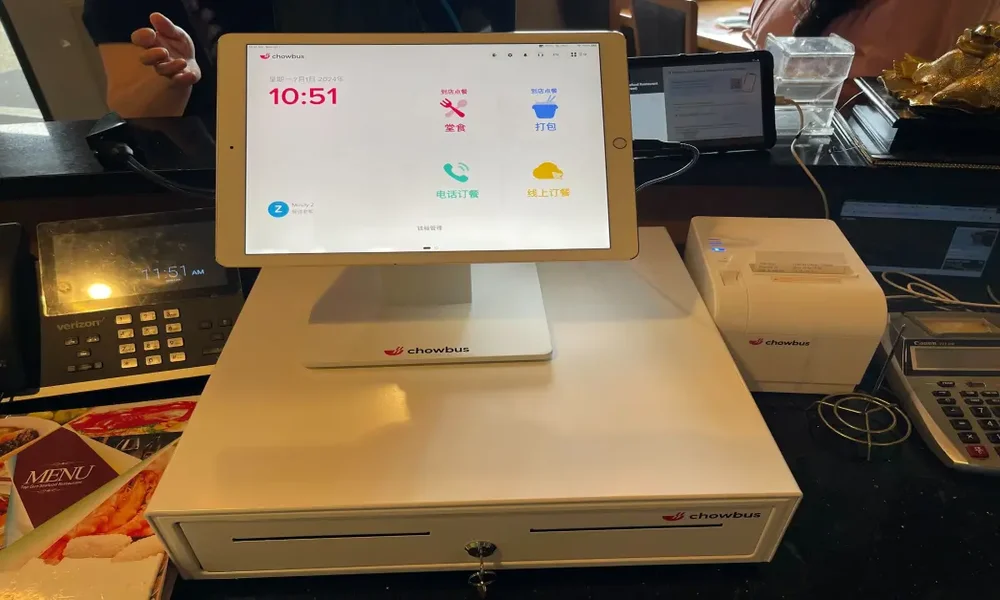
A restaurant runs more smoothly when its equipment suits the way employees work. Some businesses handle orders at a counter, while others need staff to move between different areas. The right setup makes everyday tasks easier to manage. It also helps employees keep track of payments and customer requests. POS equipment should reflect these working needs. For businesses exploring a pos system malaysia option, understanding daily operations is the first step toward finding a suitable solution.
What Hardware Supports Daily Operations?
A small counter may need only a touchscreen terminal and a receipt printer. A larger business might require extra equipment to handle orders during busy periods. The arrangement should give employees enough room to work without crowding the counter.
Useful equipment for everyday tasks includes:
- Touchscreen terminals let employees enter orders with a few taps.
- Receipt printers provide printed records for completed transactions.
- Cash drawers keep notes and coins organised during payments.
- Barcode scanners help staff record packaged items accurately.
- Customer displays show payment details before a transaction finishes.
Each device should have a clear purpose. Equipment that supports actual work needs is more useful than a collection of unused features.
Which Equipment Helps Faster Service?
Staff movement can affect the time needed to complete an order. Handheld terminals let employees enter requests away from the counter. Kitchen display screens send order details to preparation areas, reducing the need for staff to carry written notes.
- Handheld terminals allow order entry across different dining areas.
- Kitchen screens show new requests to preparation teams.
- Contactless readers accept payments through compatible cards.
- Wireless printers produce receipts near designated workstations.
- Customer displays show transaction amounts before payment approval.
The value of each device depends on its placement. A well-arranged workspace helps employees move between tasks without unnecessary interruptions.
How Can Hardware Match Business Size?
A small restaurant may manage daily transactions with one terminal. A larger operation could need several workstations to handle its workload. Buying equipment according to actual demand helps control spending.
Before expanding an existing setup, managers should consider employee numbers, counter space and expected transaction volume. They should also check whether additional devices can connect with their current system. Compatible equipment makes future changes easier to manage.
How Do Payment Devices Support Transactions?
Payment equipment gives businesses practical ways to accept money. Card readers handle card payments, while contactless terminals support compatible payment methods. Cash drawers remain useful for businesses that accept physical currency, making a pos system malaysia a practical choice for managing different payment preferences.
A suitable payment arrangement should match the methods customers commonly use. Employees also need clear instructions for handling transactions. Regular checks can help identify worn cables, damaged readers or printing problems before they interrupt daily work.
Matching equipment to everyday tasks gives restaurant employees a more organised way to work. Managers can begin with essential devices, then add more when business needs change. Regular checks help keep equipment ready for use. A sensible purchase also makes it easier to manage costs over time. The most useful setup is one that supports staff without adding unnecessary steps to their routine.
